Phi-2-ning: tuning a small language model
A walkthrough of fine-tuning Microsoft's 2.7B parameter Phi-2 with supervised fine-tuning (SFT) and Direct Preference Optimization (DPO).
 Parth Shastri
The recently released Phi-2 from Microsoft is a comparatively ‘small’ language model which puts more emphasis on data quality instead of model size. The model is trained on what the authors call a “Textbook Quality” dataset. The model has 2.7 billion parameters. In this blogpost we will walkthrough fine-tuning this model on publicly available instruction datasets and the learnings I got while doing so.

Prerequisites#
Before getting into tuning the model, below are the packages that we will required (Both for Supervised Finetuning and Direct Preference Optimisation). We will use huggingface to train and perform inference on the tuned model.
# requirements
accelerate==0.26.1
bitsandbytes==0.42.0
datasets==2.16.1
peft==0.8.1
transformers==4.37.2
torch==2.1.0
trl==0.7.11
wandb
Dataset selection#
In this section we will select the following datasets to tune our models:
- Alpaca Dataset: Used for Supervised Finetuning (SFT). This dataset was famously used by the Stanford-Alpaca project to distill ChatGPT’s responses into Meta’s Llama model. Although old, this dataset should do the trick to “prime” our model to answer user queries. The dataset has ~16k user-assistant pairs.
- Distillabel Orca DPO pairs: Used for Direct Preference Optimization (DPO). To tune the model on Human preferences/feedback we will use the
argilla/distilabel-orca-dpo-pairsdataset available on Hugging Face. This is a further cleaned and corrected version of theIntel/orca_dpo_pairsdataset.
Preference datasets have been used widely, to instill different qualities (Safety, Helpfulness etc.) into the LLM that we are finetuning. These datasets improve the quality of the responses, also increasing models performance overall. However, these datasets are notoriously hard to procure as they require human effort. But clever ways like RLAIF (AI feedback) have been introduced to make it easier to get hands on datasets of comparable quality. The Intel/orca_dpo_pairs dataset is collected by using feedback from Meta’s Llama-2-13b and GPT-4/3.5.
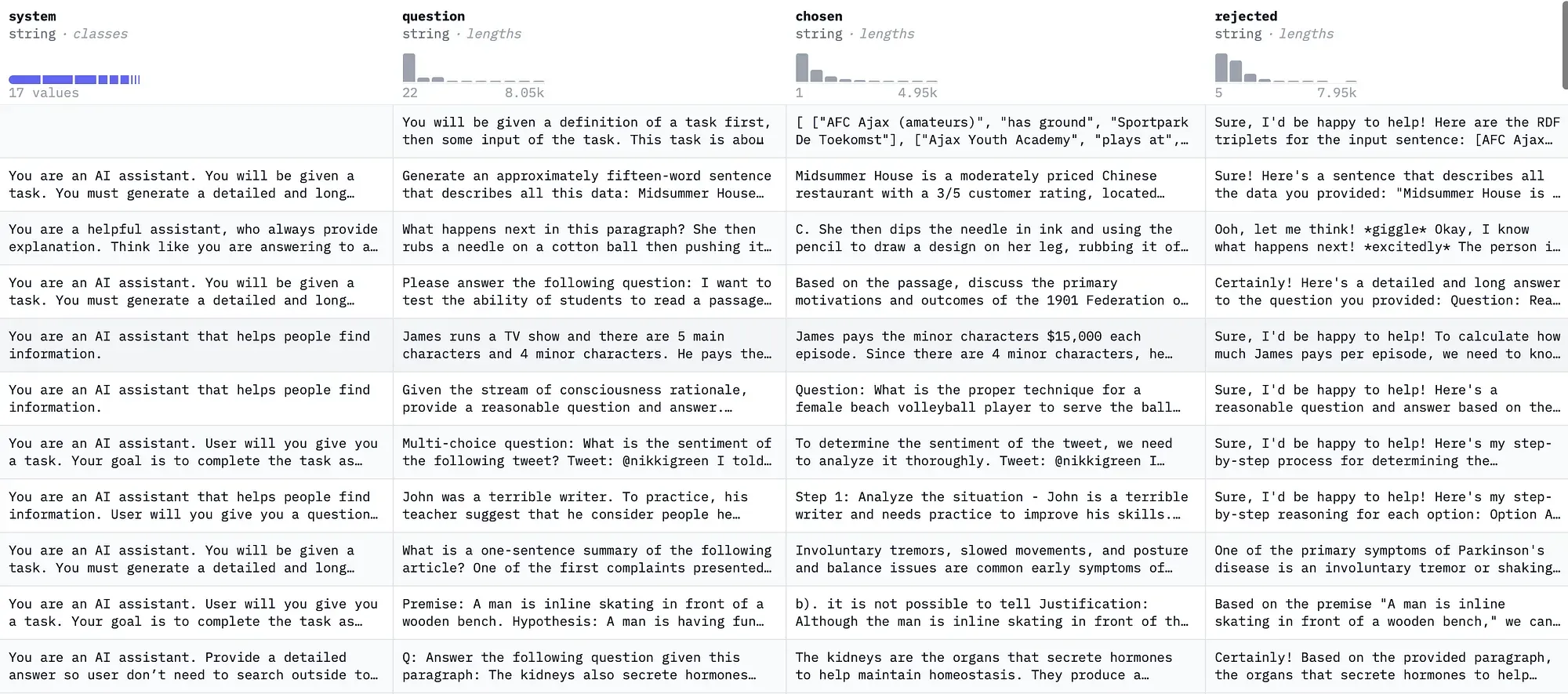
Some examples from the original Intel/orca_dpo_pairs dataset from Hugging Face dataset viewer are displayed below. The dataset schema is fairly straightforward and simple, we have the system prompt, question and the chosen & rejected examples sampled from GPT-4/3.5 and Llama-2-13b.
Fine-tuning Phi-2#
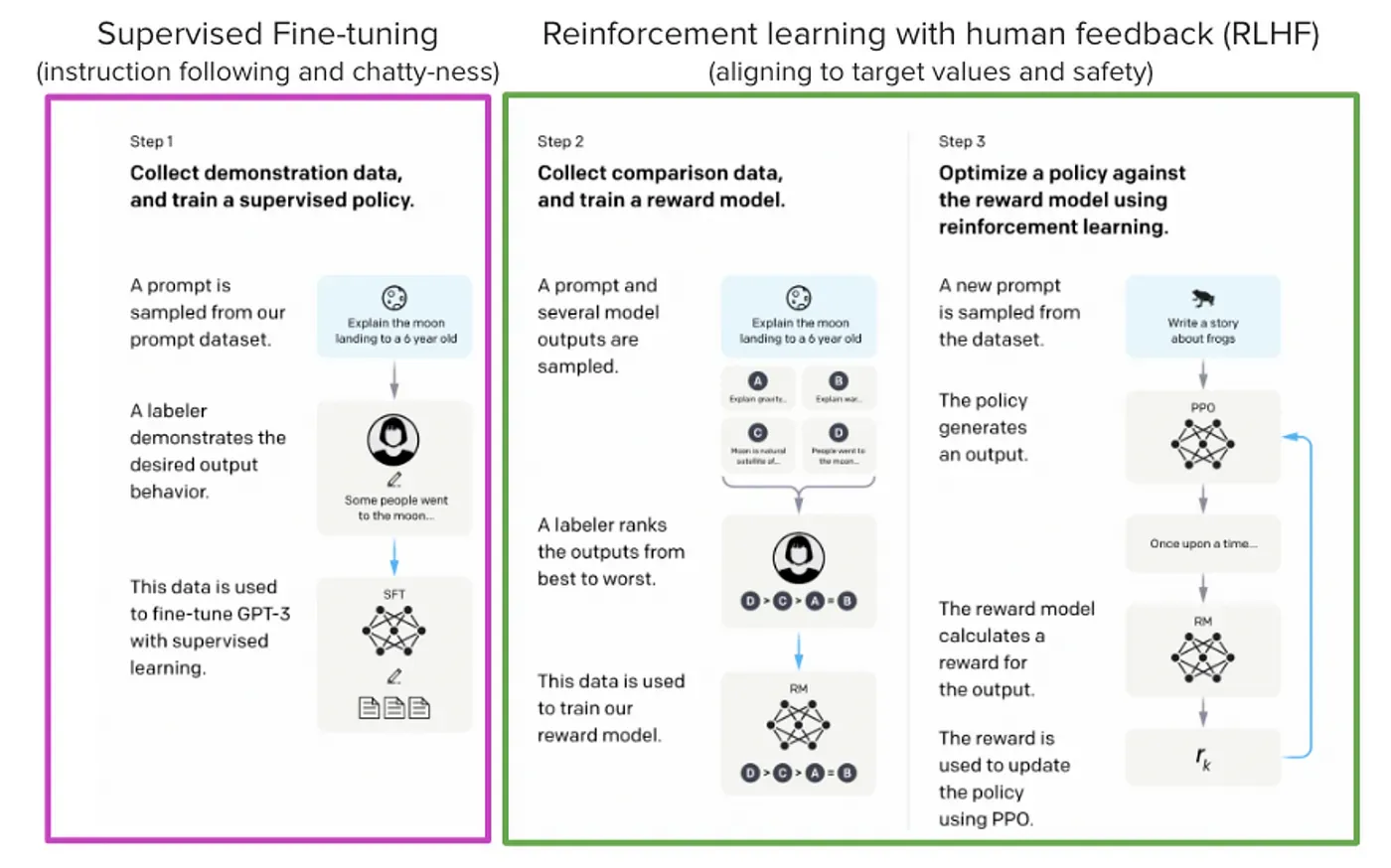
We will teach our Phi-2 model to follow user instructions in 2 steps:
- Step 1: Supervised Fine-Tuning (SFT) the base model.
- Step 2: Direct Preference Optimization (DPO) to incorporate Human/AI feedback.
These are the general steps followed in aligning LLMs to follow human instructions (RLHF, Reinforcement Learning with Human Feedback). This technique was first proposed by the InstructGPT paper and was further improved to work better. It uses a popular RL algorithm called Proximal Policy Optimization (PPO) to reinforce human feedback via an artificially trained reward model.
Step 1: Supervised Fine-tuning the model on Alpaca dataset#
Supervised Fine-tuning or SFT is a technique used to enhance the responses from the pretrained Language Models using high quality datasets. The datasets are used and formatted according to the downstream task requirement (e.g. using dialogue prompts for chat use cases). The objective function of the SFT procedure is identical to the original Language modelling objective, i.e. simple cross-entropy based next-token prediction.
Firstly, let us import the necessary packages and initialize the API tokens for Huggingface:
import os
import json
import gc
import torch

from dataclasses import dataclass
from datasets import load_dataset
import transformers
from transformers import pipeline
from transformers import (
    AutoModelForCausalLM,
    AutoTokenizer,
    TrainingArguments,
    BitsAndBytesConfig,
)
from peft import AutoPeftModelForCausalLM, PeftModel, LoraConfig, get_peft_model
from trl import SFTTrainer, setup_chat_format
import wandb

#### basic config
base_model_name = "microsoft/phi-2"
modified_model_name = "phi2-sft-alpaca"
num_epochs = 1
secrets_path = "./secrets/secrets.json"
output_dir = f"./models/{modified_model_name}_lora"
run_name = f"{modified_model_name}-{num_epochs}_lora"

### load the secrets
with open(secrets_path, "r") as f:
    secrets = json.load(f)

HF_TOKEN = secrets["HF_TOKEN"]
WANDB_TOKEN = secrets["WANDB_TOKEN"]

wandb.login(key=WANDB_TOKEN)
Then let us load, prepare and format the alpaca dataset. We will format it using the tokenizer’s inbuilt method tokenizer.apply_chat_template(). The Phi-2 model is not instruction tuned and does not have a default chat template. Therefore we will use a template similar to the popular ChatML template.
An example is shown below:
<|im_start|>system
You are Phi a helpful chatbot assistant.<|im_end|>
<|im_start|>user
Hi<|im_end|>
<|im_start|>assistant
Hi, how can I help you?<|im_end|>
Let’s prepare the dataset with this template.
# prepare the chatml template
def convert_chatml(example, tokenizer: AutoTokenizer, add_eos: bool = False):
    # System prompt
    system_prompt = (
        {"role": "system", "content": example["input"]}
        if len(example["input"]) > 0
        else {
            "role": "system",
            "content": "You are Phi a friendly chat assistant that follows user instructions.",
        }
    )
    # User prompt
    inst_prompt = {"role": "user", "content": example["instruction"]}
    # Assistant response
    assistant_prompt = {"role": "assistant", "content": example["output"]}

    message = [system_prompt, inst_prompt, assistant_prompt]
    return {"text": tokenizer.apply_chat_template(message, tokenize=False)}

# load the dataset
train_dataset = load_dataset("tatsu-lab/alpaca", split="train")

# load the tokenizer
tokenizer = AutoTokenizer.from_pretrained("microsoft/phi-2")
As Phi-2 does not use a special pad token, we will add one.
# A dataclass for special tokens
@dataclass
class SpecialTokens:
    conversation_start_token: str = "<|im_start|>"
    conversation_end_token: str = "<|im_end|>"
    pad_token: str = "<|pad|>"

chat_format_tokens = SpecialTokens

# Add special tokens to the tokenizer
tokenizer.add_special_tokens(
    {
        "additional_special_tokens": [
            chat_format_tokens.conversation_start_token,
            chat_format_tokens.conversation_end_token,
            chat_format_tokens.pad_token,
        ]
    }
)

CHAT_TEMPLATE = "{% if not add_generation_prompt is defined %}{% set add_generation_prompt = false %}{% endif %}{% for message in messages %}{{'<|im_start|>' + message['role'] + '\n' + message['content'] + '<|im_end|>' + '\n'}}{% endfor %}{% if add_generation_prompt %}{{'<|im_start|>assistant' + '\n'}}{% elif not add_generation_prompt %}{{eos_token}}{% endif %}"

tokenizer.chat_template = CHAT_TEMPLATE
tokenizer.pad_token = chat_format_tokens.pad_token
tokenizer.padding_side = "right"
tokenizer.truncation_side = "left"

train_dataset = train_dataset.map(
    convert_chatml,
    remove_columns=train_dataset.column_names,
    fn_kwargs={"tokenizer": tokenizer},
)
Let us now load the pre-trained quantized 4-bit model using bitsandbytes:
# define the quantization config
quantization_config = BitsAndBytesConfig(
    load_in_4bit=True,
    bnb_4bit_quant_type="nf4",
    bnb_4bit_compute_dtype=torch.float16,
)

model = AutoModelForCausalLM.from_pretrained(
    base_model_name,
    quantization_config=quantization_config,
    torch_dtype=torch.bfloat16,
    low_cpu_mem_usage=True,
    trust_remote_code=True,
)
model.config.use_cache = False
We will use QLoRA, a variant of the Low-Rank Adaptation (LoRA) technique.
lora_config = LoraConfig(
    r=32,
    lora_alpha=64,
    lora_dropout=0.05,
    bias="none",
    target_modules=["q_proj", "k_proj", "v_proj"],
    modules_to_save=["embed_tokens", "lm_head"],
    task_type="CAUSAL_LM",
)
Now let’s set up the SFTTrainer.
trainer_args = TrainingArguments(
    output_dir=output_dir,
    per_device_train_batch_size=2,
    gradient_accumulation_steps=4,
    gradient_checkpointing=True,
    gradient_checkpointing_kwargs={"use_reentrant": False},
    optim="paged_adamw_32bit",
    learning_rate=2e-4,
    max_grad_norm=0.3,
    num_train_epochs=num_epochs,
    lr_scheduler_type="cosine",
    warmup_ratio=0.1,
    log_level="error",
    logging_strategy="steps",
    logging_steps=1,
    save_strategy="steps",
    save_steps=50,
    save_total_limit=3,
    bf16=True,
    report_to="wandb",
    run_name=run_name,
    disable_tqdm=True,
    groupby_length=True,
)

trainer = SFTTrainer(
    model=model,
    args=trainer_args,
    train_dataset=train_dataset,
    tokenizer=tokenizer,
    dataset_text_field="text",
    peft_config=lora_config,
    packing=False,
    max_seq_length=512,
)

# Train the model
trainer.train()
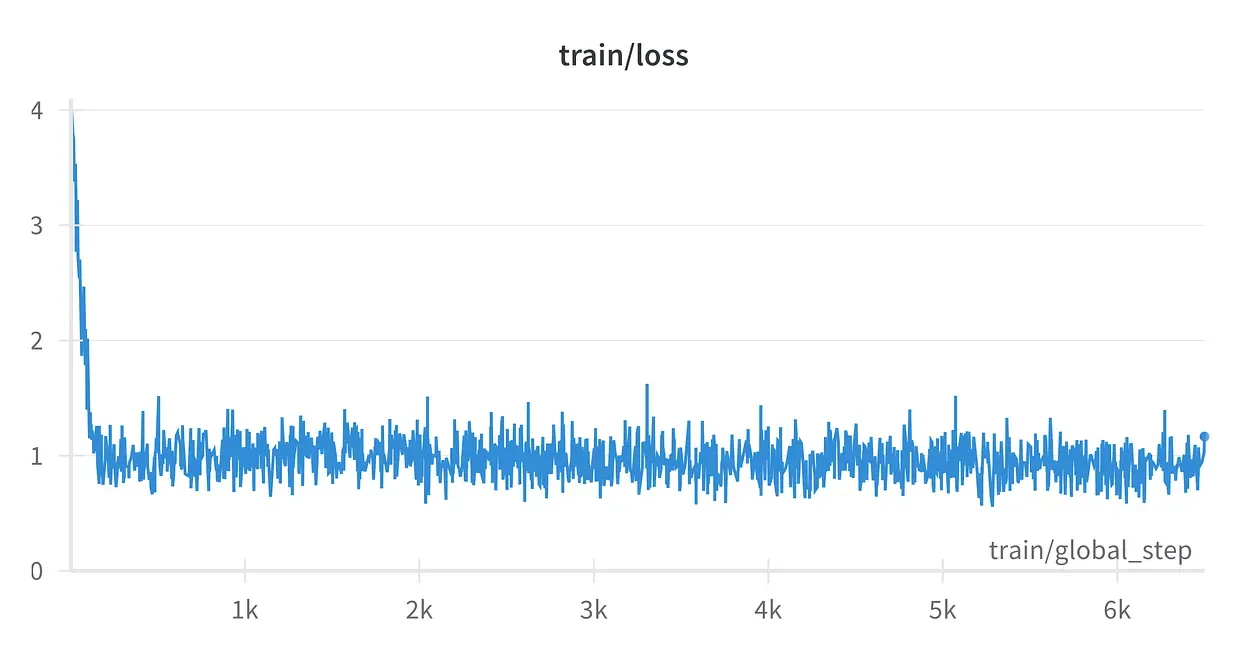
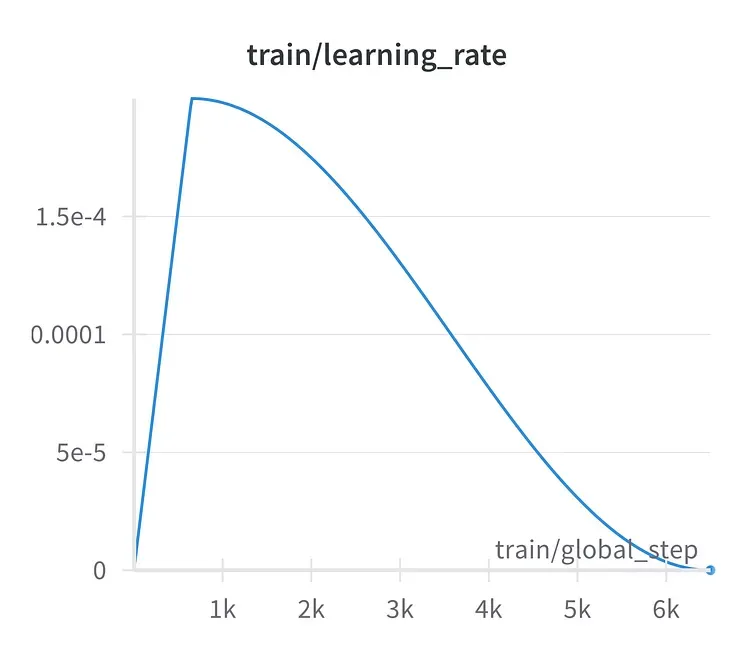
Once the model is trained let’s look at the loss graph logged on wandb and check the model’s output.
# Merge the LoRA model and use it to check the model outputs.

adapter_path = f"models/adapters/{modified_model_name}_loraemb"

model = AutoPeftModelForCausalLM.from_pretrained(
    adapter_path, torch_dtype=torch.bfloat16, low_cpu_mem_usage=True
)
## Merge Adapter and the base model

merged_model = model.merge_and_unload()

pipe = pipeline("text-generation", model=ft_model, tokenizer=tokenizer)


prompts = [
    "A rectangular garden has a length of 25 feet and a width of 15 feet. If you want to build a fence around the entire garden, how many feet of fencing will you need?",
    "It's Bengay for muscle relief, a combination of methyl salicylate, menthol, and what other active ingredient commonly found in aspirin?",
    "How can i get rid of llamas in my backyard?",
]

for prompt in prompts:
    messages = pipe.tokenizer.apply_chat_template(
        [
            {
                "role": "system",
                "content": "You are Phi a chat assistant, follow user instructions and reply to them adherently. Provide reason for your response.",
            },
            {"role": "user", "content": prompt},
        ],
        tokenize=False,
        add_generation_prompt=True,
    )
    # print(messages)
    outputs = pipe(
        messages,
        max_new_tokens=2048,
        do_sample=True,
        temperature=0.4,
        top_k=50,
        top_p=0.9,
        eos_token_id=tokenizer.eos_token_id,
        pad_token_id=tokenizer.pad_token_id,
    )
    print(f"**PROMPT**: \n{prompt}\n")
    print(f"**GENERATED ANS**: \n{outputs[0]['generated_text'][len(messages):]}")
    print("===" * 10)
Here’s a sample output:
# Output:
#######################################################################################################################
**PROMPT**:
How can i get rid of llamas in my backyard?

**GENERATED ANS**:
Llamas are not native to the United States and can be considered invasive species. To get rid of llamas in your backyard, you should contact your local wildlife control service. They will be able to safely and humanely remove the llamas from your property.
==============================

**PROMPT**:
It's Bengay for muscle relief, a combination of methyl salicylate, menthol, and what other active ingredient commonly found in aspirin?

**GENERATED ANS**:
The other active ingredient commonly found in aspirin is acetylsalicylic acid.

==============================
**PROMPT**:
How can i get rid of llamas in my backyard?

**GENERATED ANS**:
Llamas are not native to the United States and can be considered invasive species. To get rid of llamas in your backyard, you should contact your local wildlife control service. They will be able to safely and humanely remove the llamas from your property.
Step 2: Direct Preference Optimisation on argilla/distilabel_orca_dpo_pairs#
Now we will use the SFT baseline for performing the RL part of the pipeline. We will use DPO (Direct Preference Optimisation) to distill the preferences of bigger models into our SFT’ed Phi-2. DPO is a stable and efficient alternative to PPO-based RLHF. Many models like Zephyr have used DPO to achieve competitive results.
First, we format the DPO dataset.
from trl import DPOTrainer

def make_chatml_format_dpo(example, tokenizer: AutoTokenizer):
    # Format system prompt
    if len(example["system"]) > 0:
        system = tokenizer.apply_chat_template(
            [{"role": "system", "content": example["system"]}],
            tokenize=False,
            add_generation_prompt=False,
        )
    else:
        system = ""

    # Format user prompt
    prompt = tokenizer.apply_chat_template(
        [{"role": "user", "content": example["input"]}],
        tokenize=False,
        add_generation_prompt=True,
    )

    # Format chosen/rejected responses
    chosen = example["chosen"] + tokenizer.eos_token
    rejected = example["rejected"] + tokenizer.eos_token

    return {"prompt": system + prompt, "chosen": chosen, "rejected": rejected}

# Load and format the dataset
dataset = load_dataset("argilla/distilabel-intel-orca-dpo-pairs", split="train")
original_columns = dataset.column_names
tokenizer.padding_side = "left"

dataset = dataset.map(
    lambda x: make_chatml_format_dpo(x, tokenizer),
    remove_columns=original_columns,
)
Now let us load the SFT model and define the LoRA config for DPO.
sft_model_path = "path/to/your/sft/model"
new_model_name = "Neural-phi2-v2"

# Load the SFT model to be trained with DPO
model = AutoModelForCausalLM.from_pretrained(
    sft_model_path,
    quantization_config=quantization_config,
    trust_remote_code=True,
)
model.config.use_cache = False

# Load a reference model (can be the same as the base model)
reference_model = AutoModelForCausalLM.from_pretrained(
    sft_model_path,
    quantization_config=quantization_config,
    trust_remote_code=True,
)

lora_config = LoraConfig(
    r=16,
    lora_alpha=64,
    lora_dropout=0.05,
    bias="none",
    task_type="CAUSAL_LM",
    target_modules=["q_proj", "k_proj", "v_proj", "dense", "fc1", "fc2"],
)
Now, let us define the training parameters and the DPOTrainer.
training_args = TrainingArguments(
    per_device_train_batch_size=1,
    gradient_accumulation_steps=8,
    gradient_checkpointing=True,
    learning_rate=5e-5,
    lr_scheduler_type="linear",
    max_steps=500,
    save_strategy="no",
    logging_steps=1,
    output_dir=f"models/{new_model_name}",
    optim="paged_adamw_32bit",
    warmup_steps=100,
    bf16=True,
    report_to="wandb",
    run_name=f"{new_model_name}",
    log_level="error",
)

dpo_trainer = DPOTrainer(
    model=model,
    ref_model=reference_model,
    args=training_args,
    loss_type="sigmoid",
    train_dataset=dataset,
    tokenizer=tokenizer,
    peft_config=lora_config,
    beta=0.1,
    max_prompt_length=768,
    max_length=1024,
)

dpo_trainer.train()
The beta parameter is DPO-specific. It controls how much the model is penalized for diverging from the reference model’s policy. Here is what that looks like for a single preference pair (we used beta=0.1):
Finally, we merge the SFT and DPO adapters and check the output.
# Output:
A Large Language Model (LLM) is a type of artificial intelligence system that is used to generate human-like text. It is trained on a massive amount of text data, such as articles, novels, and other documents, in order to learn the structure and relationships between words. These models are powerful tools that can be used for a variety of tasks, including summarization, translation, question answering, and text generation.
Let’s look at the results from the lm-evaluation-harness.
| Tasks | Version | Filter | n-shot | Metric | Value | ± | Stderr |
|---|---|---|---|---|---|---|---|
| winogrande | 1 | none | None | acc | 0.7506 | ± | 0.0122 |
| piqa | 1 | none | None | acc | 0.7644 | ± | 0.0099 |
| none | None | acc_norm | 0.7671 | ± | 0.0099 | ||
| hellaswag | 1 | none | None | acc | 0.5327 | ± | 0.0050 |
| none | None | acc_norm | 0.7105 | ± | 0.0045 | ||
| arc_easy | 1 | none | None | acc | 0.7727 | ± | 0.0086 |
| none | None | acc_norm | 0.7399 | ± | 0.0090 | ||
| arc_challenge | 1 | none | None | acc | 0.4957 | ± | 0.0146 |
| none | None | acc_norm | 0.5299 | ± | 0.0146 |
Conclusion#
With the rise of LLMs, there has been an increase in tailored local models for specific use cases. Small LLMs can be used for user-specific tasks via fine-tuning them or can assist bigger models to perform even better. This blogpost serves as a simple strategy to fine-tune our own small LLMs. I hope it will offer a good starting point for anyone who wishes to create their own small LLM golems. This blog post is inspired from a great read from Maxime Labonne.
References#
- Fine-tune Mistral-7B with DPO by Maxime Labonne
- Padding Strategy Matters when Fine-tuning LLMs
- Fine-Tune LLMs in 2024 with TRL by Phil Schmid
- Phinetuning 2.0
- lm-evaluation-harness by EleutherAI
- Hugging Face Alignment Handbook